Navigate Stellar in MetaMask
MetaMask supports Stellar as a default network, allowing you to manage XLM and other assets. This guide walks you through how Stellar accounts work in MetaMask, including trustlines, reserves, and how to move funds.
Account and reserve
A Stellar address is not recognized on the network until it receives at least 1 XLM. Until that first deposit arrives, the address is not activated and has no on-chain presence.
Once funded, your account also maintains a minimum XLM balance that stays locked and cannot be spent. This is called the reserve and exists for as long as your account holds trustlines.
The reserve increases by 0.5 XLM for each trustline your account holds. When you remove a trustline, that 0.5 XLM is released back to your spendable balance.
In MetaMask, your XLM balance shows a total balance, spendable balance, and what's reserved (locked). The spendable balance is what you can actually use.
Trustlines
What is a trustline?
A trustline is how you tell the Stellar network that your account is willing to receive and hold a specific asset. Without a trustline for a token, your account won't be able to receive it. If someone tries to send it anyway, the transaction fails outright and no funds are lost on either side.
Creating a trustline is a real on-chain transaction that costs a small network fee and locks 0.5 XLM in reserve.
Every non-XLM token requires a trustline before you can receive it.
Activating a token (creating a trustline)
Trustlines can be created in MetaMask in two ways:
- Automatically (same-chain swap): When you swap from and into a token on Stellar, MetaMask automatically bundles the trustline creation into the swap. You don't need to activate the token separately. This does not apply to cross-chain swaps (or bridging into Stellar).
- Manually (all other transaction types): You can manually activate tokens through the token details page. This creates a trustline as its own transaction.
Your spendable balance drops by 0.5 XLM for each trustline created.
A cross-chain swap (bridge) cannot create a trustline on your behalf. If you're bridging a token (other than XLM) into your Stellar account from another chain, you must manually activate the trustline first using the steps below. If the trustline isn't in place when the bridged funds arrive, the funds can be lost.
MetaMask will flag this and prompt you to activate the trustline before you confirm a cross-chain bridge.
To manually activate a trustline:
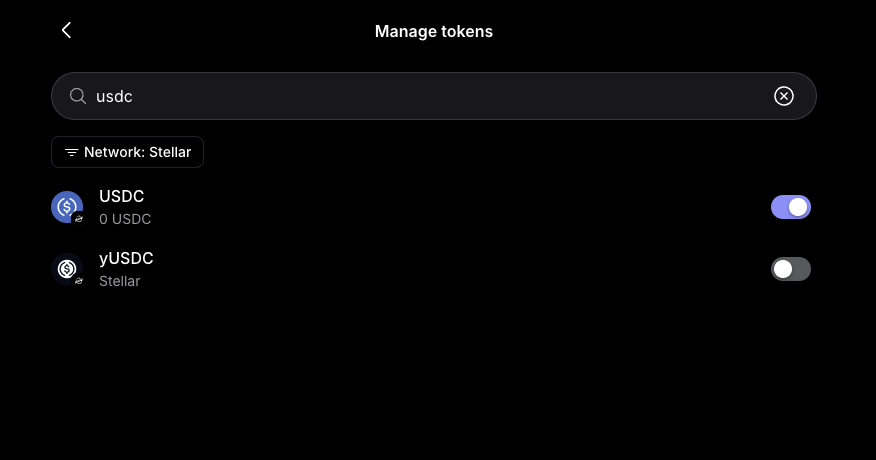
- Click the three dots in the top right of the Tokens tab and select 'Manage Tokens'.
- Find your desired token in the list or through the search bar and toggle it on.
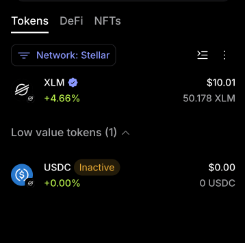
- The token will be added to your tokens list on the homepage with an 'Inactive' label. Click into the token.
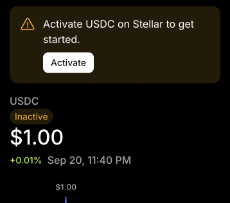
- Select 'Activate'.
- Review and confirm the transaction. Remember, this costs XLM and your reserve balance will go up while your spendable balance goes down. This is expected each time you establish a trustline.
You can view the trustline creation in your 'Activity' tab.
The most common reason a trustline activation doesn't go through is not having enough spendable XLM to cover the 0.5 XLM reserve. Check your spendable balance (not your total balance) before activating.
Deactivating a token (removing a trustline)
You can remove a trustline once a token's balance is exactly zero. Go to the token's details page and click on the 'Remove' button. This releases the 0.5 XLM reserve back into your spendable balance.
If the removal fails, the token likely still has a non-zero balance.
How to move funds to and within Stellar
If you're moving XLM to a brand-new, unfunded Stellar address, the amount must be at least 1 XLM. Sending less will fail. Sending any token other than XLM to an unfunded address will also fail. The recipient account needs that first 1 XLM deposit
There are a few ways to get assets into Stellar in MetaMask:
- MetaMask's built-in swap feature
- Buying XLM directly in MetaMask
- Transferring from a centralized exchange
- MetaMask's send feature
Swap to XLM or another token
You can swap from another chain directly into XLM or another token like USDC on Stellar using the Swap button on the MetaMask homepage.
For cross-chain swaps (bridging from another chain into Stellar), of any token other than XLM, you must manually activate the trustline first using the steps outlined above. MetaMask will prompt you to activate the trustline before you confirm a cross-chain bridge. Do not proceed without activating the trustline first.
For same-chain swaps (swapping between tokens that are both already on Stellar), MetaMask automatically creates any necessary trustline as part of the transaction. No separate activation needed.
- Select the token you want to exchange and its source network (example: ETH on Ethereum).
- Select the token and network you want to receive (example: XLM on Stellar).
- Enter the amount.
- Review the quote and confirm.
Buy XLM
You can buy XLM directly in MetaMask using the Buy button on the homepage. Note: Buying crypto in MetaMask is not available in every country or region.
- Click 'Buy' on the MetaMask homepage.
- Select the token you want to buy (XLM) and the Stellar network.
- Select the account you want to buy into and confirm your region.
- Enter the amount you want to purchase.
- Select your payment method and tap 'Continue' or 'Get quotes'.
- Review the quote and complete your purchase.
For more details, see our guide on how to buy crypto in MetaMask.
Transfer from a centralized exchange
If you already hold XLM on an exchange, you can send it to your MetaMask Stellar account.
- Log in to the exchange you want to withdraw from.
- Find the token you want to transfer and select 'Send' or 'Withdraw'.
- Paste your MetaMask account address. Always double-check you've pasted the full and correct address.
- Select the Stellar network and enter the amount you want to withdraw.
- Enter any two-factor authentication codes required.
- The transfer usually arrives within a few minutes. Check your recent transactions to confirm.
Sending tokens
- The recipient address must already have a trustline for the token. If it doesn't, the send will fail. The transfer won't go through at all until the recipient activates the trustline.
- For new, unfunded accounts, you can only send XLM. Sending less than 1 XLM or any other token will fail.
To send tokens:
- Click 'Send'.
- Paste the recipient address in the 'To' field or choose from contacts.
- Select the token and enter the amount you want to send.
- Review and confirm the transaction.
FAQs
Why did my trustline activation fail?
The most common cause is not having enough spendable XLM to cover the 0.5 XLM required to open the trustline. Check your spendable balance (visible on the XLM token details page). If it's below 0.5 XLM, you'll need to add more XLM before you can activate.
I sent a token to someone and the transaction failed. Did they lose the funds?
No. If the recipient doesn't have a trustline for the token, the send fails cleanly and nothing is deducted from your account. The recipient needs to activate the trustline first and then you can retry the transfer.
Why can't I send my full XLM balance?
Part of your balance is locked in reserves. Every Stellar account requires a minimum of 1 XLM to stay active, plus an additional 0.5 XLM for each trustline you hold. This locked amount is your reserved balance. It's not lost, just held back from use.
In MetaMask, your XLM token details page shows your total balance and your spendable balance. The spendable balance is what you can actually send.
How do fees on Stellar work?
Stellar network fees are paid in XLM and come from your spendable balance. Standard MetaMask fees apply.